



Managing players
How to manage players in a tournament, including marking present, paid, and handling the waiting list.
The player management page for a tournament allows you to view, add, and manage all participants before the tournament starts. This page is accessible only to authenticated users with the appropriate permissions.
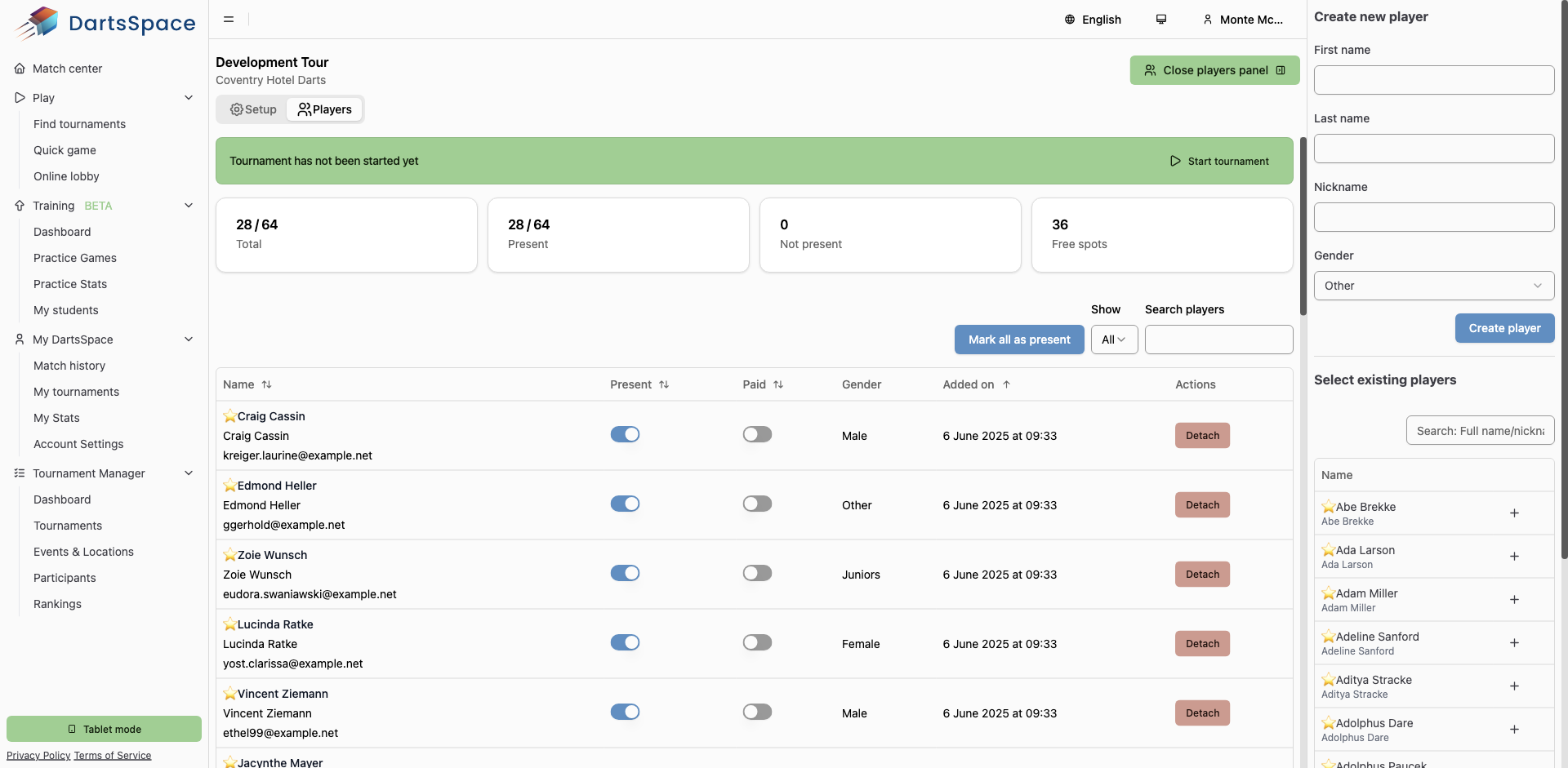
Player Overview & Stats
At the top of the page, you will see summary cards showing:
- Total: The number of players currently attached to the tournament and the maximum allowed (e.g., 28/64).
- Present: The number of players marked as present (e.g., 28/64).
- Not present: The number of players not marked as present.
- Free spots: The number of available spots left in the tournament.
- On the waiting list: (If applicable) The number of players exceeding the max allowed, who are on the waiting list.
Player Table
The main table lists all players with the following columns:
- Name: Player's name, email, and a star icon if they have a Dartsspace account. Players on the waiting list are indicated with a badge.
- Present: Toggle to mark a player as present. Only present players will be included when the tournament starts.
- Paid: Toggle to mark if a player has paid the entry fee.
- Gender: Player's gender (Male, Female, Other).
- Added on: Date and time the player was added to the tournament.
- Actions: Options to edit (for non-Dartsspace accounts) or detach a player from the tournament.
Bulk Actions & Filters
- Mark all as present: Button to quickly mark all players as present (only available before the tournament is closed).
- Show: Filter players by all, waiting list only, or without waiting list.
- Search players: Search by name, nickname, or email.
Adding and Managing Players
On the right sidebar:
- Create new player: Add a new player by entering their first name, last name, nickname, and gender. Click "Create player" to add them to the tournament.
- Select existing players: Search and select from existing participants to add them to the tournament.
Present & Paid Toggles
- Use the toggles in the table to mark players as present or paid. Only present players will be included in the tournament draw.
The minimum amount of player marked present is 6.
You do not need to remove absent players from the tournament, they will be removed automatically when the tournament starts. - Players not marked as present will be removed from the tournament when it starts.
Waiting List
- If the number of players exceeds the maximum allowed, extra players are placed on the waiting list. You can filter to view only waiting list players.
- Players on the waiting list will automatically be added to the tournament when a spot becomes available. They will get notified via e-mail when this happens.
Detaching & Editing Players
- Detach: Remove a player from the tournament.
- Edit: For non-Dartsspace accounts, you can edit player details.
Tips
- Ensure all players who will participate are marked as present before starting the tournament.
- Use the search and filter options to quickly find and manage players.
- Only users with the correct permissions can add, edit, or detach players.